Who is the odd man out? (Part 2)
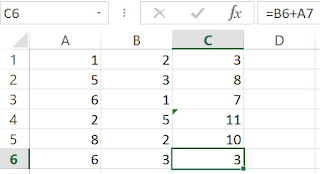
To recap, the aim in finding an inconsistent cell is that the inconsistency may indicate an error, or an inconsistent design. Excel provides a convenient way to identify a cell that is inconsistent with its neighbors. It puts a green triangle at the upper left corner. This is shown in the following diagram. There are two disadvantages. 1. Inconsistent cells at the end of a column or row are not highlighted. 2. The green triangle (or error flag) is also used to indicate other types of errors. The different errors are listed in Home/Options/Formulas/Error Checking Rules. There is another to identify inconsistent cells. This is done by first selecting the "consistent" block of cells (C1:C6 in this case), then select Home /Find and Select / Go To Special / Column Differences. The result is as shown. "Column Differences" Note that two cells are highlighted (C4 and C6). This method may be harder to use if the block of cells stretches over a screen...
