Posts

Showing posts with the label Power Detective

Who is the odd woman out? (Part 2)
Image
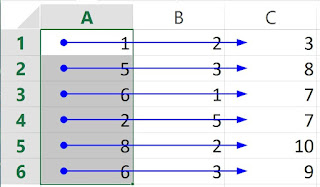
Given a column of "similar" cells, how do we check whether the cells are used "consistently" by other cells? Any inconsistency could be a sign of error, or inconsistent design. The only quick method to check this is by the use of "Trace Dependents", or even better with "Multi-Dependents". (The slow and not so visually effective method is to use the "Find" function. Find "A1", find "A2", and so on,) For example, in this diagram, the column of cells (A1:A6) are used consistently. The dependent arrows from these cells are "consistent". In the next diagram, the arrows show many irregular patterns, indicating that the cells A1:A6 are not used consistently. To get these diagrams, 1) With "Trace Dependents". Select cell A1. Click on "Trace Dependents" under Formula Auditing. Repeat for cells A2 to A6. Alternatively, 2) With Multi-Dependents. Select A1:A6, click on "Mult...

Who is the odd man out? (LibreOffice Calc)

In the previous posts, we see how we can use Excel to identify a cell with an inconsistent formula compared to its neighbors. The aim is to identify potential errors, or inconsistent designs. For LibreOffice Calc users, similar methods are available, as listed in the following table. Method Excel LibreOffice Calc Show Formula Yes Yes Show R1C1 Formula Yes (Check Options) Yes (Check Options) Formula Error Flag Yes (Check Options) - Row / Column Differences Yes (Find and Select / Go To Special) - (There is a similar function, but it needs a macro program.) Precedent Arrows    Single-cell Precedents Yes (Formula Auditing / Trace Precedents) Yes (Detective / Trace Precedents)    Multiple-cell Precedents Need a macro (e.g. VisualCheck or Power Formula Auditing ) Need a macro (e.g., VisualCheck  for LibreOffice or Power ...