Posts

Showing posts with the label Spreadsheet

Chameleon text and number in spreadsheets. Watch out for this trap.
Image
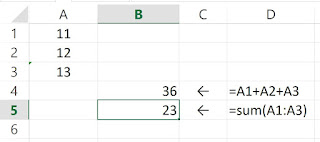
In Excel, a text is sometimes treated as a text and sometimes as a number. This can be quite confusing and can lead to wrong calculations. Users have to be aware of this and ensure that the cells in a summation are numbers. Here is an illustration. A1 and A2 contain numbers 11 and 12. A3 contains a text "13". In an addition where each cell is explicitly added, as in cell B4, "13" is treated as the number 13. But. In a sum formula, as in cell B5, "13" is treated as a text and is not added to the sum. Spreadsheet users have to be very careful that each cell in a summation is a number. Otherwise, the cell "number" will not be added. This chameleon quality applies to some other formulas also.

When is a spreadsheet not a spreadsheet?

Very often, a so-called spreadsheet is only a table of values, without a single formula. That's not really a spreadsheet. Example: The so-called Trump 2018 budget spreadsheet:  Third Way Statement on the Leaked May 8 Trump Budget

What makes a spreadsheet a spreadsheet?

What makes a spreadsheet a spreadsheet, and not a word document or a database or a calculator? What is the most basic and defining feature of a spreadsheet? "The key feature of spreadsheets is the ability for a formula to refer to the contents of other cells, which may in turn be the result of a formula."  "The ability to chain formulas together is what gives a spreadsheet its power."                                ( https://en.wikipedia.org/wiki/Spreadsheet ) Yes, it is this feature of chaining formulas. A formula refers to a cell that itself may be another formula. Spreadsheet users could design complex chains of formula. However, once built, there is no easy way to see the chains of formula. That is not a good situation. Imagine a city that has built a network of roads but has no map of the roads. This is where "trace precedent" and "trace dependent" come in.  If you are at o...

Doing Magic with Trace Precedents

Image
Trace precedent is a basic function. It draws an arrow from one cell to another cell when the first cell appears in the second cell's formula. That means the second cell makes use of the first cell's value. When enhanced with VBA progamming, trace precedent can do some interesting stuff. For example. it can trace everything in a worksheet and give a different color to separate groups. A sample result is in the following diagram. This colorful set of precedents and groups can be easily done by users of any level. The details are in this book:   Influence charts: How to easily gain a powerful overview of your Excel spreadsheet model